
1. Go to https://www.mumble.info/downloads and download/install the latest version of mumble.
2. Run Mumble
3. Select "Add New"
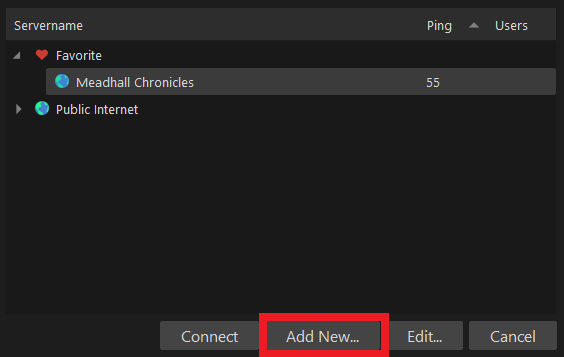
4. Fill out the following:
Address: meadhallchronicles.mumble.com
Port: 63561
Username: (full character name)
Label : Meadhall Chronicles
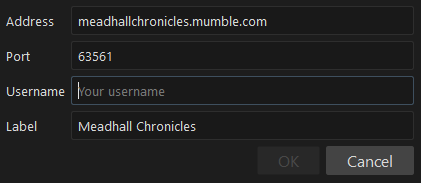
5. Hit Connect
6. Fill out the password: TBA
7. Now once you're in, select the cogwheel.
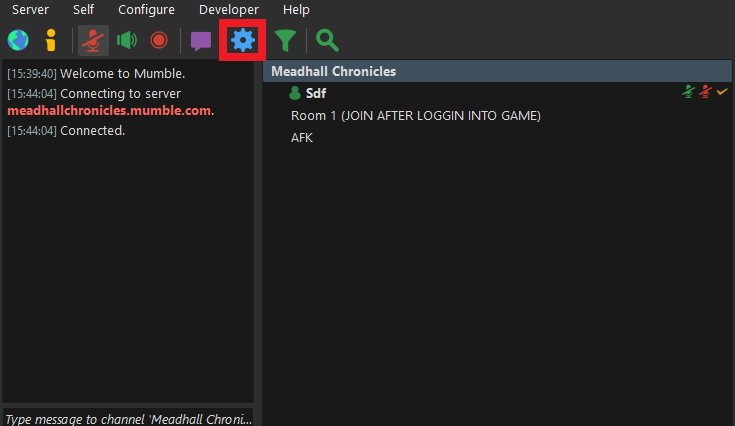
8. Go to Audio Output
9. Under Positional Audio select ENABLE and Headphones

10. Select Plugins
11. Under Options enable Link to Game and Transmit Position
12. In the game list under plugins scroll down until you see "Link" and check the enable box.
13. MAKE SURE YOU PRESS APPLY AND OK

14. Once you have done all that and have logged into the Valheim server, right click "Room 1" and press join ONLY AFTER YOU HAVE LOGGED INTO THE IN GAME SERVER.
15. If you have any questions or problems please please please open a ticket.
16. You MUST open mumble BEFORE you launch Valheim.